This Hermes Skill Writes Your Other Skills
Point the agent at your code, a docs page, or a job you just did — and it writes the skill file for you. Plus the three things that make it make sense: what a skill is, why your whole library only costs about 3,000 tokens, and why the 60-character description decides whether it ever runs.
The best Hermes skill is the one that writes your skills for you.
Most videos about agent skills are a tour of somebody's six favourites. Install this one, install that one, look how clever. It is entertaining and it goes stale in a month, because which skills exist changes constantly.
There is one that does not go stale, because it is not about a task. It is the skill that turns a job you already know how to do into a new skill, without you writing anything. You point the agent at some code, or a documentation page, or you just walk it through a job once — and it writes the file.
This page covers that, and the three things you need to know first for it to make sense: what a skill actually is, why having a hundred of them is free, and how the agent decides which one to use.
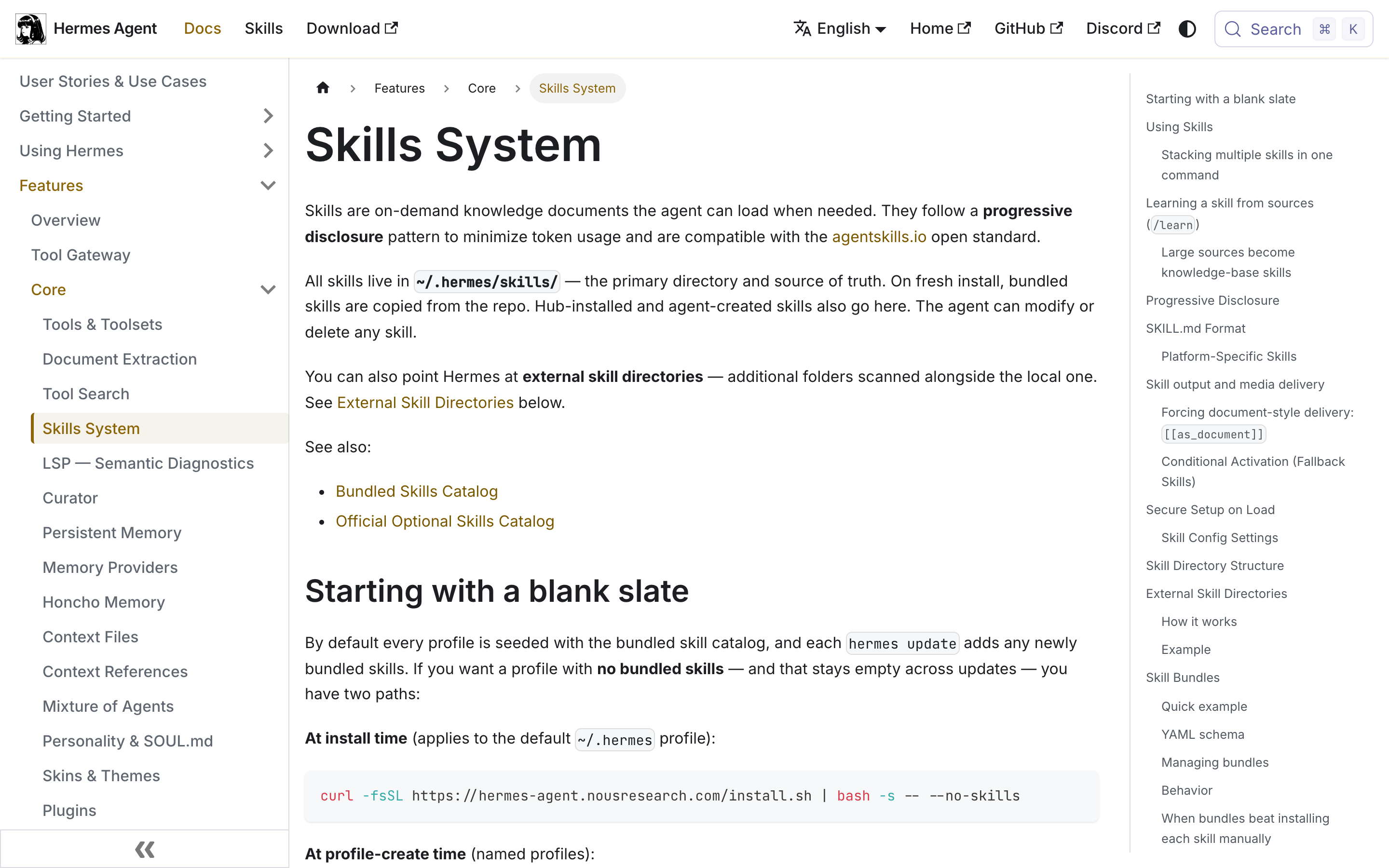
Checked 10 August 2026. Every command, count and field name below is read off the Hermes documentation or the community catalogue, both linked at the end. Skill catalogues change weekly.
A skill is a markdown file with a settings block at the top.
That is the whole thing. No code runs. Nothing compiles. It is a text file the agent reads when it decides the file is relevant, and the instructions in it become part of what the agent is trying to do.
They live in one folder:
~/.hermes/skills/Making one by hand is three commands and a text editor:
$ mkdir -p ~/.hermes/skills/my-category/my-skill
$ cd ~/.hermes/skills/my-category/my-skill
$ nano SKILL.md
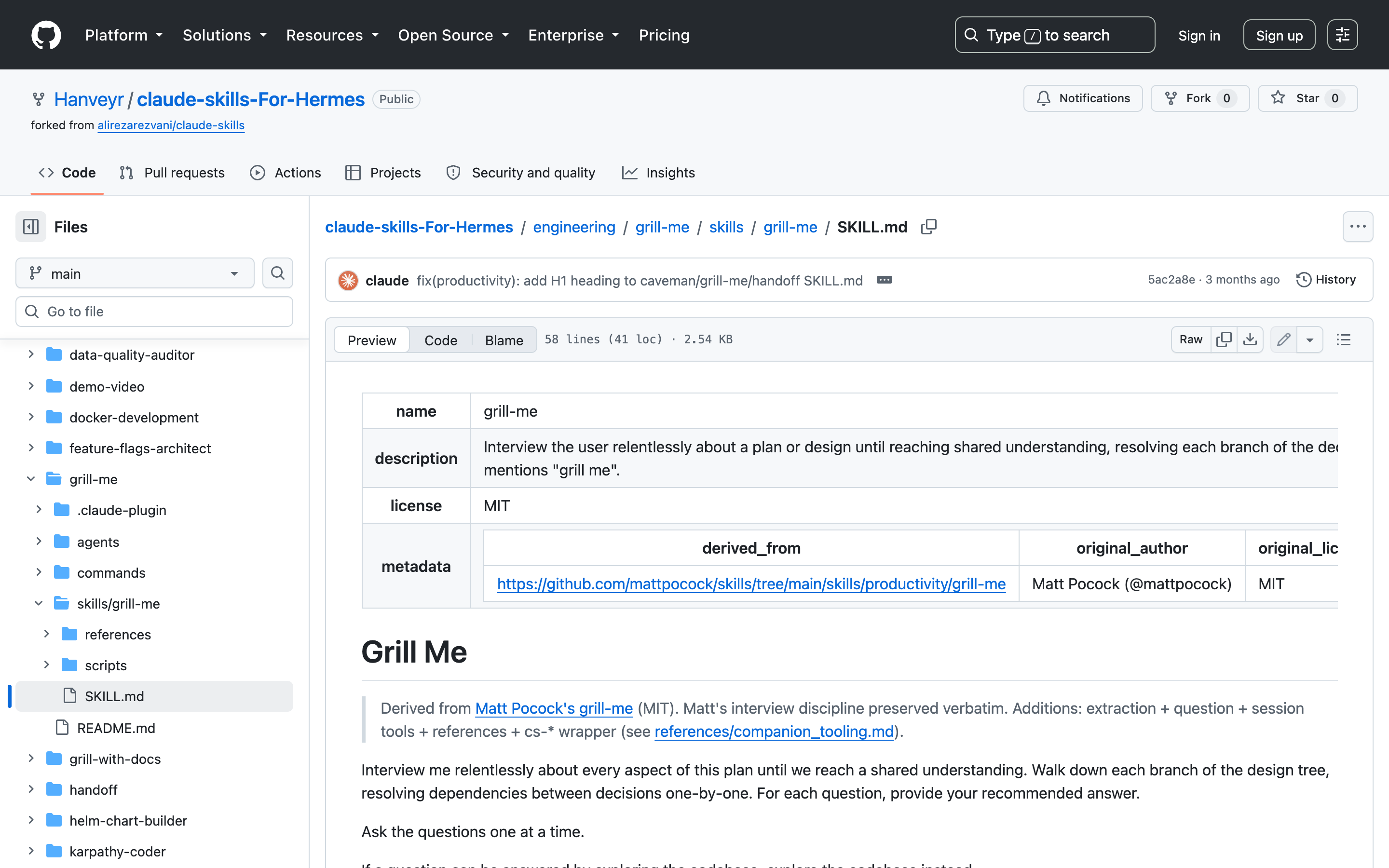
The file has a settings block at the top in YAML, then normal markdown underneath. The documented structure for the markdown half is a fixed running order, and it is worth copying because it maps onto how the agent reads it:
- Title and a one-line intro.
- When to Use — the conditions that should trigger it.
- Quick Reference — the commands or calls, so it does not have to read the whole thing to remember a flag.
- Procedure — the steps.
- Pitfalls — what goes wrong.
- Verification — how to confirm it worked.
Because it is only text, you can read any skill from beginning to end in about two minutes before you trust it. That is not true of most things you install, and it is the single best habit to build here.
Five fields are required. The optional ones are where the useful behaviour hides.
Required: name, description, version, author, license. Nothing surprising.
The optional fields are the ones nobody mentions, and several of them solve real problems:
| Field | What it does |
|---|---|
platforms | Limits the skill to macOS, Linux or Windows. Leave it out and it runs everywhere. Use it for anything that shells out to platform-specific commands. |
requires_toolsetsrequires_tools | Hides the skill when the listed tools are missing. A skill that needs a browser should not be offered when there is no browser. |
fallback_for_toolsetsfallback_for_tools | The reverse — hides the skill when the listed tools are present. This is how you write a worse-but-always-works backup that gets out of the way when the good tool is available. |
related_skills | Points at skills that pair with this one. |
required_environment_variables | Declares the API keys it needs, each with a prompt and a help string, so the agent can ask you for them properly instead of failing. |
required_credential_files | Same idea for OAuth files, with a path and a description. |
blueprint | Runs the skill on a schedule. Takes cron format, or plain phrasing like every 2h. |
config | Settings the skill keeps in config.yaml. |
Two of those deserve a second look.
The fallback pair is a genuinely good idea. Most people's skills break in the "sometimes the good tool is there and sometimes it isn't" case. Instead of writing one skill full of if-statements, you write two — the good one that requires the tool, and the fallback that hides itself whenever the good one is available.
blueprint turns a skill into a scheduled job. A skill with every 2h in its settings block is not something you invoke; it is something that runs. That is a different category of thing from "a document the agent reads", and it is buried in an optional field.
How is this different from an MCP server?
If you have used Claude Code or Cursor you have already installed MCP servers, and skills look like they overlap. They do not, and the distinction is clean once you have heard it:
| A skill | An MCP server | |
|---|---|---|
| What it is | Instructions — a document | A connection — running software |
| What it gives the agent | Knowledge of how to do something | The ability to reach something |
| Solves | Doing the work the way you want it done | Getting at a database, an API, a system |
| Costs when unused | One line in a list | Its tool definitions, on every request |
| You debug it by | Reading a markdown file | Reading logs |
The short version: MCP is how the agent reaches your systems. A skill is how you want the work done once it gets there.
They are not alternatives and you will normally use both together. A skill that says "when adding an endpoint, follow these conventions and check it against the schema" needs an MCP server to actually read the schema. The skill is the method; the server is the access.
One practical consequence worth knowing. MCP tool definitions are typically loaded on every request, so a lot of connected servers is a real, permanent context cost. Skills are the opposite by design — a list of names until one is needed. If your context is filling up, the servers are the more likely culprit.
The agent only reads the skill it needs. It sees a list of the rest.
This is the part that makes the whole system work, and it explains why the honest answer to "how many should I install" is not "as few as possible."
Loading happens in three stages, and each has a named function in the docs:
| Stage | Call | What loads | Cost |
|---|---|---|---|
| Always on | skills_list() | Just the name, description and category of every skill | about 3,000 tokens |
| When one matches | skill_view(name) | That skill's full instructions | varies |
| Only if needed | skill_view(name, path) | One specific extra file the skill points to | varies |
So the permanent cost of your entire skill library is roughly 3,000 tokens — one line per skill. A skill you never use costs a name and a short description. The instructions only get read when the skill is actually picked.
That number is worth holding onto, because it is the answer to the only real objection. Three thousand tokens is small against a modern context window. Breadth is cheap.
But notice what that design does to the thing you should worry about. If the agent picks a skill using nothing but a name and a short description, then the description is the entire matching surface. The instructions can be perfect and the skill will never run if the description does not sound like the job.
Hermes caps that description at 60 characters. Sixty characters is your whole shot at being found.
Write it as the moment it should fire, not as what it contains.
Almost everyone writes descriptions as labels — a summary of the skill's contents. That is the wrong shape, because the agent is not browsing a catalogue. It is asking "does this match what I am doing right now?"
Two examples of the same skill:
| Weak | Better |
|---|---|
| Database utilities and helpers | Write and review SQL migrations safely |
| Notes about our API conventions | Adding or changing a REST endpoint |
| Design system stuff | Building any new UI component |
The left column describes contents. The right column describes a situation. The agent is matching against a situation.
This also explains the most common complaint about skills — "it ignored my skill." Usually it did not ignore it. Another skill with a vaguer, broader description matched first. If two of your skills could plausibly cover the same request, one of them will win and it may not be the one you wanted. Overlapping descriptions are the actual bug, and you will not see it by reading the instructions.
You can type it, stack it, ask for it, or let the agent decide.
Every installed skill automatically becomes a slash command. Beyond that there are four routes:
- Type it directly.
/plan Design a REST API for a todo appor/ascii-art Make a banner that says HELLO WORLD. - Stack several. You can chain up to five in one command:
/skill1 /skill2 request text. This is the feature almost nobody uses and it is the one that changes how you work — a research skill plus a formatting skill plus your house style, in one line. - Just ask. "What skills do you have?" works in plain conversation.
- Let the agent pick. It reaches for skills itself based on the descriptions.
That last route is the important one to design for. A rule you have to remember to invoke is a rule you will forget on the day you are tired, which is the day you needed it. Anything phrased as "always do X" needs to be findable by the agent on its own, which brings you straight back to the description.
Finding and installing skills is the same handful of commands:
$ hermes skills list                  # everything you have
$ hermes skills                       # interactive on/off, per platform
/skills search docker                 # search from inside a chat
/skills browse                        # browse the hub
Installing:
$ hermes skills install official/research/arxiv
/skills install official/creative/songwriting-and-ai-music
$ hermes skills install https://example.com/SKILL.md --name my-skill
One gotcha that will waste ten minutes of your life. Installed skills only take effect in new sessions. If you install one and it does not appear, you have not done anything wrong — run /reset to start fresh, or open a new session.
And if two skills have the same name, the rules are fixed: a skill in your local folder beats one from an external directory, and a bundle beats an individual skill when the names collide.
Point it at something you already know, and it writes the file.
Now the part that makes the rest worth learning. The agent can write and update skills itself — the documentation calls this skill_manage — and there is a command built on top of it that removes the hand-writing step entirely.
You give it a source. It does the reading. It produces the SKILL.md.
The sources it will take:
- A folder of code on your machine. It reads the files and works out the conventions.
- A documentation page on the web. It fetches and extracts.
- A job you just walked it through. This is the one people miss. Do the task once, with the agent watching, then tell it to turn that into a skill.
The result is a working slash command available in every future session.
Why this matters more than any individual skill: the imported ones encode other people's habits, which may or may not be yours. The ones that actually pay back are made out of the correction you have now typed at an agent four times this week. Those are, by definition, not in anyone's catalogue — and writing them by hand is enough friction that most people never do it.
A reasonable first three, if you want somewhere to start:
- Your project's conventions. Point it at your own repository. Where things live, how things are named, what the tests look like.
- The thing you keep correcting. Whatever you retype most often. Write it so the agent can find it on its own — this one should never need a slash command.
- Your release or deploy procedure. Walk it through once, in order, and have it capture the steps including the parts that always go wrong.
Then read what it wrote. It is a text file and this takes two minutes. Fix the description first — that is the field doing the work.
Seventy-two built in, across seventeen categories.
Hermes ships with 72 skills already loaded. You do not install these. Here is the full breakdown:
| Category | Skills | Category | Skills |
|---|---|---|---|
| Creative | 16 | Research | 5 |
| Productivity | 9 | Apple | 4 |
| Software Development | 9 | Autonomous AI Agents | 4 |
| MLOps | 7 | Media | 4 |
| GitHub | 6 | Computer Use | 1 |
| Data Science | 1 | Note-Taking | 1 |
| 1 | Smart Home | 1 | |
| Social Media | 1 | Dogfood | 1 |
| Yuanbao | 1 |
Named ones you can go and look at include plan, github-pr-workflow, github-code-review, ascii-art, architecture-diagram, comfyui, duckduckgo-search, excalidraw, ocr-and-documents, deploy-k8s, vllm, youtube-content and google-workspace.
Beyond the built-ins there is a 101-skill optional catalogue that ships with the agent and can be switched on, and roughly 85 community skills, plugins and tools.
One useful detail about the format: because a skill is only a markdown file, it moves between tools. Skills in the community catalogue advertise working in Hermes, Claude Code, OpenClaw, Cursor, Windsurf, Cline and Codex. Claude Code uses the same shape at its own path:
~/.claude/skills/<name>/SKILL.mdTreat that as portable-in-principle rather than guaranteed. The file format ports. Whether a specific skill's assumptions about available tools port with it is a per-skill question, which is exactly what requires_tools exists to declare.
Run it on purpose before you rely on it finding itself.
There is a documented way to test a skill directly:
$ hermes chat --toolsets skills -q "Use the X skill to do Y"Do this in two passes, because they test different things:
- Force it. Name the skill explicitly, as above. This tests whether the instructions are any good.
- Do not force it. Describe the job in your own words without naming the skill, and see whether it gets picked up. This tests the description.
A skill that passes the first and fails the second is the most common outcome, and it is the one people misdiagnose as the agent being unreliable. It is not. It is a description that does not sound like the job.
Your first skill, start to finish.
Everything above is theory until you have one. This is the shortest path to a working skill made out of your own work, and it is worth doing before you install anything from a catalogue.
- Pick the correction you keep repeating. Not a big idea — the small sentence you have typed at an agent several times this week. "Use our error wrapper, not raw try/catch." "Tests go next to the file, not in a tests folder." That is the raw material.
- Do the job once, with the agent watching. Work through a real instance of it, correcting as you go. Do not narrate what it should do in the abstract — do the actual thing.
- Ask it to turn that into a skill. It writes the file, including the settings block.
- Open the file and read it. Two minutes. Check the description especially — that is the part that decides whether it is ever found again.
- Start a new session. Skills do not appear in the session you made them in.
- Test it twice — once by name, once by describing the job in your own words without naming it:
$ hermes chat --toolsets skills -q "Use the X skill to do Y"   # tests the instructions
$ hermes chat --toolsets skills -q "<describe the job normally>"  # tests the description
If the first works and the second does not, the instructions are fine and the description is wrong. Rewrite it as the situation it should fire in, not as a summary of what the skill contains, and test again.
That loop — write, read, test both ways, fix the description — is the whole discipline. Everything else is a catalogue.
Four things people say about this, and whether they are right.
"This is just prompt engineering with extra steps." Partly fair. A skill is instructions, and instructions are prompting. What is different is when they load — you are not choosing to include them, the agent picks them up when the situation matches. A prompt you have to remember is not a discipline. That is the actual difference, and it is smaller than the marketing suggests and bigger than nothing.
"Won't the agent just ignore them?" Sometimes, and there is a specific reason. It is not reading your skill and deciding against it — it never loaded it, because the description did not match. That is fixable and it is the thing to check first.
"Isn't a hundred skills going to confuse it?" Tokens are not the problem — the whole index is about 3,000. Ambiguity is. Twenty skills with sharp, distinct descriptions work better than eight with vague overlapping ones. Prune for overlap, not for count.
"Why not just put it all in one big instructions file?" Because that file is loaded every time, whether or not it is relevant, and it grows until it is mostly noise. Splitting it means each piece is only present when it applies. That is the same argument as the three-level loading, applied to your own writing.
Honest limits.
- A skill cannot make the model smarter. It supplies instructions and context, not ability. If the model cannot do the task, a document telling it to do the task well does not change that.
- Overlapping descriptions are the main failure mode and they get worse as you add skills. The library is cheap in tokens; it is not free in matching accuracy.
- Installing a skill is running someone else's instructions. You are putting a file into a folder your agent reads. That is fine and normal — and it is a supply chain. Read it, which takes two minutes.
blueprintmeans a skill can run without you. A scheduled skill is a background job. Know which of yours are scheduled.- Counts move weekly. All the numbers here were read on 10 August 2026.
- Watch for a sponsor in the "run it 24/7" step. Videos on this topic often attach a specific hosting company there. Running an agent on a server is real content; whose server it is is an advertisement.
Install a few. Then write your own, without writing them.
The short version: a skill is a markdown file, your whole library costs about 3,000 tokens, the 60-character description is what decides whether it ever runs, and you can stack five at once.
Install a handful of other people's for disciplines you do not have. Then point the agent at your own repository, or at the job you did this morning, and let it write the skill. That is the one that keeps paying, because it is made out of your work rather than someone else's.
Everything above, traceable to a primary source.
- hermes-agent.nousresearch.com Hermes Agent — Skills System (the loading rules)
- hermes-agent.nousresearch.com Hermes Agent — Working with Skills
- hermes-agent.nousresearch.com Hermes Agent — Creating Skills (SKILL.md, frontmatter, validator)
- hermes-agent.nousresearch.com Hermes Agent — documentation
- anthropic.com Anthropic — Introducing Agent Skills
- github.com GitHub — mattpocock/skills
- github.com GitHub — ZeroPointRepo/awesome-hermes-skills (the community catalogue)
- github.com GitHub — a real SKILL.md, in full (grill-me)
- claudecodexmastery.space The Hermes skills docs, scrolled — where the loading rules are actually stated
- claudecodexmastery.space The community catalogue, scrolled