ChatGPT Voice 2.0 Just Dropped. Here's What Actually Changed.
The interface is identical and the engine is new. Why the old one talked over you, how it stays fast and smart at the same time, which of the two models your plan puts you on, and the five things you can do with it — ending with the one worth being careful about.
The app looks identical. Everything behind the button was replaced.
You tap the same button in the same place and something different answers. That is why the update feels strange, and why most walkthroughs cannot explain it — they are filming an interface that deliberately did not change.
On 8 July 2026 OpenAI shipped GPT-Live, a new set of voice models, and made it the engine behind ChatGPT Voice. Two weeks later, on 23 July, voice arrived in the desktop app with the ability to actually operate your computer.
This page covers what changed underneath, which model you are talking to, what it can do at five increasing levels of capability, and the one thing worth being careful about — which is not the part anyone demos.
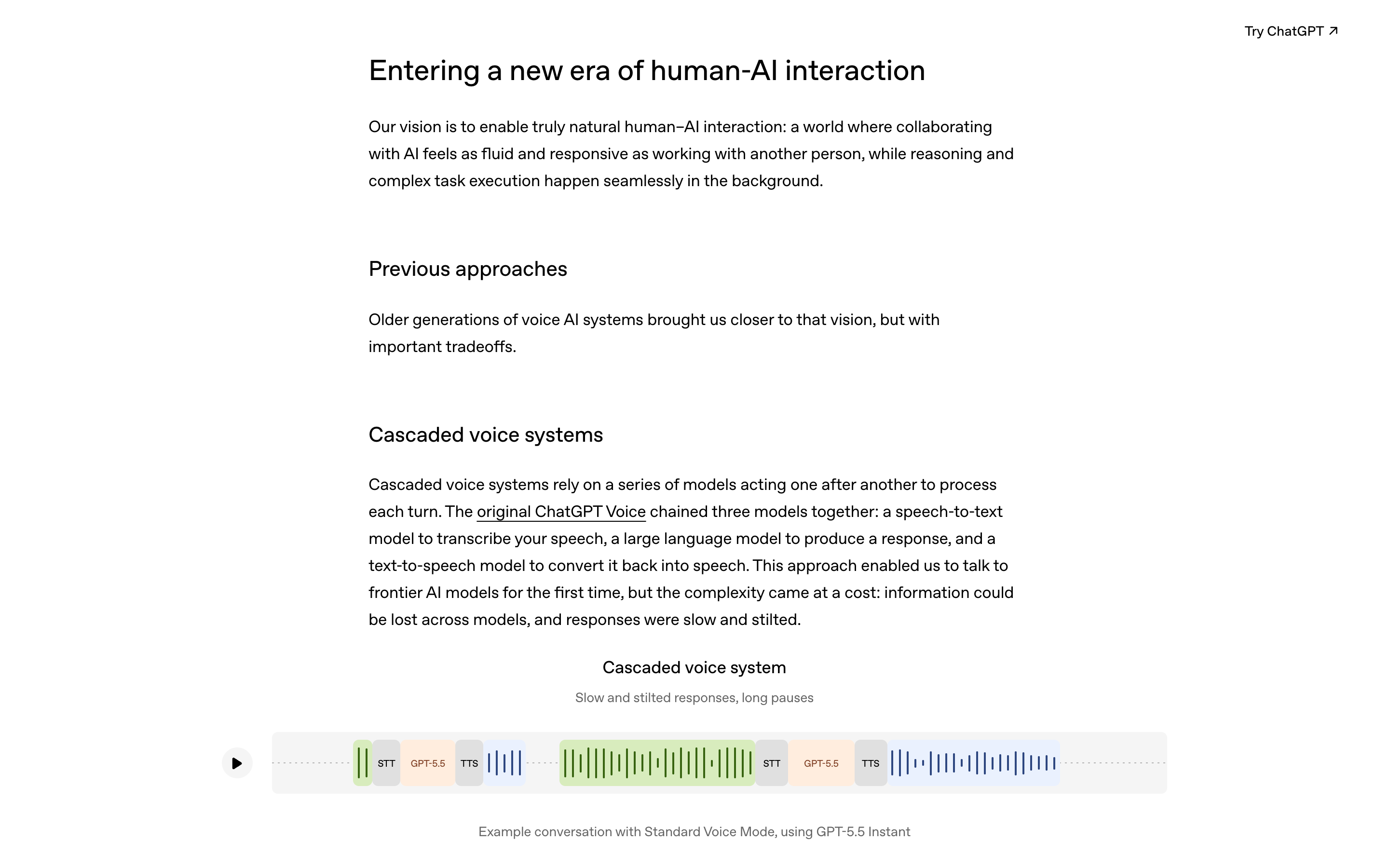
Checked 10 August 2026. The model names, the plan split, the launch date and the usage figure all come from OpenAI's own announcement, linked first at the end. Nothing here is guessed from a demo.
Voice assistants have now been built three ways.
Every annoying thing about talking to an AI traces back to which of these you were using.
| Generation | How it worked | What you noticed |
|---|---|---|
| Chained (original ChatGPT Voice) |
Three separate models in a row: one turned your speech into text, one wrote a reply, one read it aloud. | Slow and stilted. Detail got lost between the models — tone, hesitation, emphasis never reached the part that was thinking. |
| Turn-based (Advanced Voice Mode) |
One model handling audio in and out. Faster and smoother — but still strict turns. | It had to wait for you to stop before replying. And it decided you had stopped by listening for silence. |
| Full-duplex (GPT-Live) |
Processes what you are saying while it is speaking. Listening and talking at the same time. | It can react mid-sentence, and it can stay quiet while you think. |
That middle row is worth sitting with, because it explains the complaint everyone had. If a system decides your turn is over by detecting silence, then pausing to think reads exactly like finishing your sentence. So does a dog barking, or a car going past. That is the whole reason the old voice mode talked over you at the worst possible moments — not rudeness, and not a bad model. One design decision.
Full duplex removes that guess. It is what allows the small things people describe as making it feel alive: saying "mhmm" while you are still going, quick overlapping back-and-forth, and staying quiet during a pause instead of rushing to fill it.
It keeps talking to you while a bigger model does the actual work.
Smart and fast are normally opposites — better answers take longer. GPT-Live gets around this in a way worth understanding.
It does not answer hard questions itself. When something needs a web search, real reasoning or actual work, it hands the job to a larger model in the background and brings the answer back when it is ready. At launch, that background model is GPT-5.5. While it waits, GPT-Live carries on talking to you and holds the thread of the conversation.
So the waiting did not disappear. It got hidden behind a conversation, which is genuinely clever product design.
It is also worth naming plainly, because it changes how you should listen: the voice talking to you is not always the thing answering you. The chatty part is a fast model keeping you company. The answer arrives from somewhere else. When a reply comes back confident and instant, that is the conversational layer — not necessarily a considered answer.
OpenAI also lists higher-effort variants, GPT-Live-1 Medium and GPT-Live-1 High, which use GPT-5.5 Thinking at medium and high reasoning effort.
Two models, and your plan decides.
| Model | Who gets it |
|---|---|
| GPT-Live-1 | Go, Plus and Pro |
| GPT-Live-1 mini | Free |
Rolling out globally on iOS, Android and ChatGPT.com. API access was flagged as coming, not shipped.
This matters if you are following a tutorial. When a demo works better than your attempt, the first thing to check is not your wording — it is whether the person recording was on a paid plan. A video made on Pro and followed on Free is a comparison between two different models.
That said, do not overstate it. The mini is a smaller model, but it is the same full-duplex architecture — free users get the real conversational behaviour, not the old turn-based mode with a new label. Independent testers rated ChatGPT's free voice ahead of Gemini's paid tier even before this upgrade. The gap between the two GPT-Live models is about the quality of the thinking, not the feel of the conversation.
One more thing, because it gets repeated everywhere. The real figure from OpenAI is that more than 150 million people each week talk to ChatGPT using features like Voice and Dictation. That is voice and dictation combined. It is usually quoted as "150 million weekly voice users", which is a bigger claim than the source supports.
Five levels, from useful to genuinely uncomfortable.
Capability here is a ladder rather than a feature list, and each rung asks more of you in terms of trust.
Several jobs at once
You can hand it a few tasks in one breath and it will work on them together rather than making you queue. The practical shift is that you stop composing one instruction at a time.
Worth knowing: it will ask a clarifying question mid-flow rather than guessing, which is the behaviour you want and the main reason this is more useful than it sounds.
Your computer, from somewhere else
Sign into the desktop app on the same account and you can reach your machine from your phone. Ask what you last saved, have it retrieve something, or set work going while you are out.
This is the first rung where the risk changes. You are now operating a machine you cannot see.
It can see what you are looking at
Bring it up over any window and it uses what is on screen as context. You can be looking at a pricing page and ask which plan suits you, and it answers about the plans in front of you rather than in the abstract.
This is the most immediately useful level, and the one to be careful about in a different way: whatever is on your screen is now part of the conversation. That includes the other tab.
It follows you around
The window detaches and moves with you between apps, so the conversation is continuous rather than something you enter and leave. Mostly an interface improvement, and it makes levels 1 to 3 much more natural to use.
It operates the interface for you
Fully hands-free: it reads the screen, clicks buttons, moves through pages, and reports what it did. "Select that option and go to the next page" works.
The genuinely notable part is not the clicking. It is that it will fill forms in on your behalf using what it knows about you — you can hand it a long questionnaire and ask it to choose the answers that fit your situation, and it will.
Read that twice. It is a real capability and a real time-saver, and it is also the moment the assistant starts making small decisions in your name, on a form, that someone else will read as your answers.
Gemini Live and Grok are solving different problems.
Worth knowing what you are choosing between, because the three have genuinely diverged rather than copying each other.
| Built around | Strongest at | Free tier | |
|---|---|---|---|
| ChatGPT / GPT-Live | Full-duplex conversation with a bigger model reasoning in the background | Talking — long conversations, thinking out loud, translation | Yes, on the mini |
| Gemini Live | Perception — camera and screen | Showing it things, and Android and Google-services integration | Yes, on the base plan |
| Grok | Live access to X, plus web search | Anything where being current matters most | Yes |
The honest split: pick on what you want it to do, not on which is best. For conversation, questions and thinking out loud, GPT-Live is the one. If your use is mostly pointing a camera at something, Gemini's perception focus is a real design difference rather than marketing. If you need what happened in the last hour, Grok's data access is something the other two cannot match.
And since all three have a free tier, this is a decision you can make by trying rather than by reading a comparison table — including this one.
Talking to it well is different from writing a good prompt.
Most prompt advice assumes you are typing. Speaking is a different medium and a few things change.
- Say the constraint first, not last. In writing you can bury "but keep it under 200 words" at the end and it still counts. Out loud, front-load it — you are talking to something that starts responding before you have finished.
- Interrupt on purpose. Full duplex means cutting in is now a supported move rather than a failure. If it starts down the wrong path, say so immediately instead of waiting politely for it to finish.
- Use it for the messy first pass. Voice is much faster than typing for thinking out loud, describing a half-formed idea, or talking through a problem. It is worse for anything where the exact words matter.
- Switch to typing for precision. Names, IDs, file paths, code, anything spelled. Dictation errors on a filename produce confident work on the wrong file.
- Let the pause do its job. The old mode punished thinking. This one does not, so you can stop rushing to fill silence — which was a habit the previous version trained into people.
- Ask it to repeat the plan back. Cheap in conversation, and it catches misunderstandings before they become actions.
One habit worth keeping from the typed world: if the answer matters, check the transcript rather than trusting what you heard. Spoken answers are harder to scan and much easier to half-listen to, which is precisely when a confident wrong detail slips past.
Speaking removes the pause where you would have read it.
Every demo of level 5 is impressive. Here is the thing none of them mention.
When you type "delete everything in Downloads", there is a beat where the sentence sits in front of you and you can look at it. When you say "tidy up my desktop" while doing something else, that beat does not exist. The reply comes back friendly, fluent and already underway.
The interface is built for flow, and approval is the one thing you do not want flowing. This is not a flaw in the product — it is the direct consequence of making conversation frictionless, and it is worth handling deliberately.
Four habits, none of which cost you much:
- Name the target, not the goal. "Suggest folders for Downloads, move nothing" instead of "sort this out". Goals get interpreted. Targets do not.
- Keep the transcript visible. Everything spoken is written down as you go. That is where a wrong assumption is catchable while it is still an assumption.
- Separate proposing from doing. Ask for the plan in one turn, approve one named item in the next. Two turns is not slow — it is the entire safeguard.
- Type anything you cannot undo. Sending, publishing, buying, deleting. Convenience is worth very little on irreversible actions.
And on level 5 specifically: if it is filling in a form that represents you — an application, a profile, a survey someone will act on — read the answers before submitting. It is choosing on your behalf from what it knows about you, which is not the same as what you would have said.
Stated by OpenAI, or found while making this.
- It has an accent in some languages. OpenAI says GPT-Live is optimised for the most popular languages in ChatGPT, and that for certain languages the model may have a non-native accent or gaps in fluency. If you are working in anything other than English, test before you rely on it.
- The background model will change. GPT-5.5 is what it hands hard questions to today, and OpenAI says this will be updated as new models ship. Answers on difficult questions can therefore change without the voice sounding any different.
- Your plan decides your model. Free is on the mini.
- No API yet. It was announced as coming.
- "150 million" covers Voice and Dictation together. Do not repeat it as a voice-only number.
- Screen context means whatever is on screen. At level 3 and above, close what you would not want included.
- Our screenshots of OpenAI's pages are archived copies, and each one says so. The live pages sit behind a bot check that an automated browser cannot get past — we tested at six seconds and at twenty-five, and both returned the challenge instead of the article. The archived copies show the real page. The links at the end point at the live originals.
A much better conversation, attached to a real hand.
The short version: the interface is the same, the engine is new. Full-duplex audio means it can listen while it speaks, so it stops cutting you off. A bigger model works in the background, so it can keep talking while it thinks. Two models, split by plan. And on the desktop it can now operate your machine.
All of that is a genuine improvement, and none of it makes it something you should stop reading. Give it context freely, give it permissions narrowly, and keep the transcript where you can see it.
Everything above, traceable to a primary source.
- openai.com OpenAI — Introducing GPT-Live (8 July 2026)
- help.openai.com OpenAI Help Center — ChatGPT Voice
- help.openai.com OpenAI Help Center — Voice Mode FAQ
- techcrunch.com TechCrunch — OpenAI releases new voice models for more natural live conversations
- techcrunch.com TechCrunch — the new voice mode reaches the ChatGPT desktop app
- fortune.com Fortune — OpenAI brings ChatGPT Voice to the desktop app
- claudecodexmastery.space OpenAI's GPT-Live announcement, scrolled — archived snapshot, 25 July 2026
- claudecodexmastery.space The desktop-control coverage, scrolled